
Table of Contents
- 1. What's a network, in one paragraph
- 2. The internet didn't appear overnight
- 3. IP addresses: from binary to dotted decimal
- 4. The OSI / TCP/IP stack
- 5. TCP vs UDP — the two transports
- 6. Client-server, the model literally every app uses
- 7. The common application protocols
- 8. Routing — how a packet actually finds its way
- 9. What IPv6 fixes (and why it took 30 years)
- 10. What I'd take away
Last update: June 2026. All opinions are my own.
Condensed notes from my undergraduate Networking course. The goal here is to land the mental model — what the layers are, how an IP address is structured, why TCP and UDP both exist, how a router actually decides where to send a packet — without the textbook scaffolding. Every diagram in this post is from the original course material.
1. What's a network, in one paragraph
A network is two or more devices connected through some transmission medium so they can share information. The devices are called nodes, stations (on wireless), or hosts (the term TCP/IP uses). When the nodes sit in the same physical place, the network is a LAN (local area network); when they span geographies via shared links, it's a WAN (wide area network).
Instead of wiring every host directly to every other host (that would scale terribly), you connect each one to a central node — a switch or a wireless access point — which forwards packets between them. That forwarding-within-a-LAN job is called switching. To talk to another LAN, you need a router, which is the bridge between separate networks.
This is the whole vocabulary you need to read the rest of the notes.
2. The internet didn't appear overnight
A quick reminder of how long this took:

The shape that matters: the curve is exponential. The protocols we still use today were designed when there were thousands of hosts, then handed a world of billions. A lot of the weirdness in IPv4 — the address shortage, NAT, private ranges — comes from that mismatch.
3. IP addresses: from binary to dotted decimal
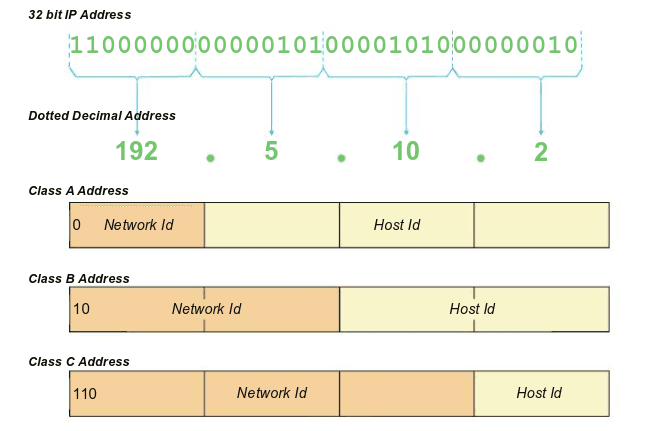
An IPv4 address is 32 bits. Humans don't read 32 bits, so we split it into 4 groups of 8 bits — 4 octets — and write each octet as a decimal number 0–255 separated by dots. That's where 192.168.1.1 comes from.
Two pieces of information live inside every IP address:
- Network ID — which network this host is on.
- Host ID — which specific device on that network.
Where the split sits depends on the class of the address (in the original 1980s-era classful scheme):
| Class | First octet | Network ID bits | Host ID bits | Networks | Hosts per network |
|---|---|---|---|---|---|
| A | 0–127 | 8 | 24 | 126 | ~16.7 M |
| B | 128–191 | 16 | 16 | ~16 K | ~65 K |
| C | 192–223 | 24 | 8 | ~2 M | 254 |
That's why a home IP usually looks like 192.168.1.x — 192.168 is in Class C, so the first three octets are the network ID and only the last octet identifies your specific device. Your laptop, phone, router, and printer all share 192.168.1.* because they're on the same network; the digit at the end is just which device you are.
What "same network" actually means
Two hosts are on the same network when they share the same network ID. They can talk directly. If the network IDs differ, the packet has to go through a router to cross between the two networks.

4. The OSI / TCP/IP stack
Networks are built in layers. Each layer doesn't care what the layers above or below it are doing — it just provides a service to the layer above and uses the service of the layer below. The classical reference model is the OSI 7-layer model:
| # | Layer | What it does | Example |
|---|---|---|---|
| 7 | Application | Talks to the user / app | HTTP, SMTP, DNS |
| 6 | Presentation | Encryption, compression, format translation | TLS, JPEG |
| 5 | Session | Opens / maintains / closes a conversation | NetBIOS |
| 4 | Transport | End-to-end delivery; reliability | TCP, UDP |
| 3 | Network | Where does this packet go? | IP, ICMP |
| 2 | Data Link | Frame this packet for the physical wire | Ethernet, Wi-Fi |
| 1 | Physical | The wire / radio | Cables, RF |
TCP/IP collapses this to 4 layers (Application / Transport / Internet / Network Access), but the OSI layout is the one you actually see in textbooks and on exam questions.


The cleanest way to internalise the model is to look at what happens to a single packet as it travels down the stack on the sending side. Each layer wraps the data from the layer above in its own header — like nesting envelopes:

Vocabulary that's easy to mix up:
- Segment — a TCP packet.
- Datagram — a UDP packet, or an IP packet (yes, both use the term — TCP is the odd one out).
- Frame — a Data-Link-layer packet.
5. TCP vs UDP — the two transports
The transport layer (layer 4) has two protocols, and the difference between them is the most important pair of concepts in networking.
TCP is connection-oriented. It guarantees delivery, in order, with no duplicates, and adapts its sending rate to congestion. The cost is overhead — a three-way handshake before you can send anything, an acknowledgement for every packet, and a teardown sequence at the end.
UDP is connectionless. You write the address on the front and shove the packet onto the wire. No handshake, no acknowledgements, no guarantee it arrives at all. The cost is unreliability. The benefit is speed and simplicity.
When does each one win?
| Use case | Why |
|---|---|
| HTTP / HTTPS (web pages) | TCP — you need every byte of the page, in order |
| SSH, SMTP, FTP, IMAP | TCP — every command and response has to arrive intact |
| DNS | UDP — single short query, single short response, you can just retry |
| VoIP, live video, gaming | UDP — a stale packet is worse than no packet at all; better to drop and move on |
| DHCP | UDP — you don't have an IP address yet, so a stateful handshake is awkward |
Both TCP and UDP use port numbers to identify which application a packet is for. A web server listens on port 80 (HTTP) or 443 (HTTPS); an SSH server on 22; a DNS server on 53. The combination (IP address, port) is called a socket — that's how the OS routes incoming bytes to the right process.
6. Client-server, the model literally every app uses
Almost every application on the internet uses the client-server model: one side requests, one side responds.
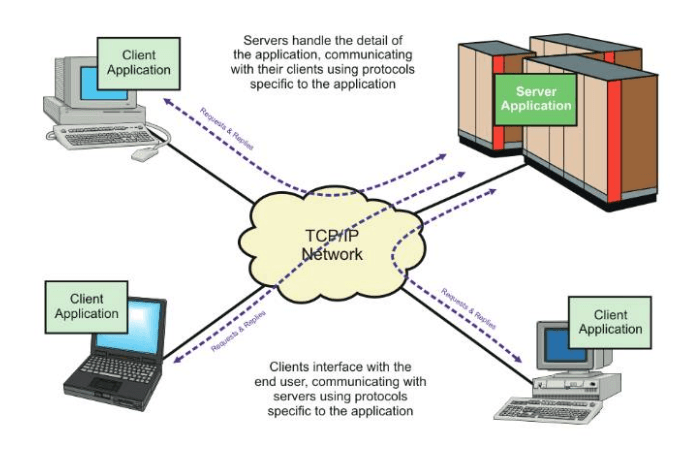
The vocabulary worth remembering:
- The server does a passive open — it binds to a port, waits for incoming connections, and doesn't dial out.
- The client does an active open — it picks a server's address and port and dials in.
- A client sends a request; the server sends a response.
This is the shape of almost every familiar protocol: HTTP (client = browser, server = web server), SMTP (client = mail submission agent, server = mail server), DNS (client = resolver, server = nameserver), etc.
7. The common application protocols
A pile of the user-facing applications that defined what the early internet was actually used for:

These all sit at OSI layer 7 (Application) and run over TCP at layer 4 — because every one of them needs every byte to arrive in order.
8. Routing — how a packet actually finds its way
Once you understand IP addresses and the layer model, the question is: how does a packet I send from my laptop in Madrid actually reach a server in California?
The short answer: routers, one hop at a time, each one consulting a routing table.
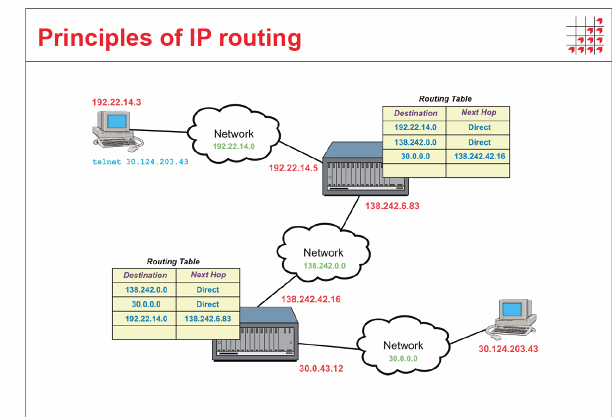
The mechanics:
- Your laptop wants to send a packet to
30.124.203.43. It looks at the destination and asks: is this address on my local network? - If yes, it sends the frame directly to the destination's MAC address. Done.
- If no, it sends the frame to its default gateway — the router on its local network that knows how to reach the outside world.
- The router receives the IP packet, looks at the destination address, consults its routing table, and either delivers it directly (because it's connected to that destination network) or forwards it to the next router.
- Repeat until a router is directly connected to the destination network and delivers the frame.
The router never cares about the full path — it only cares about the next hop. Each router on the path makes its own local decision.
ipconfig — your own machine's view
If you've ever wondered what the output of ipconfig on Windows (or ifconfig / ip addr on Linux) is telling you, here's the cheat sheet:

- IPv4 Address — your machine's address on this network.
- Subnet Mask — bitwise AND it with the IP address to recover the network ID.
/24(255.255.255.0) means "the first three octets are the network ID". - Default Gateway — the router that handles anything not local. Everything not on
192.168.1.*goes here. - Link-local IPv6 — auto-configured, used only for local communication, never routed.
9. What IPv6 fixes (and why it took 30 years)
The Internet Assigned Numbers Authority (IANA) ran out of IPv4 addresses in 2011. There are 2³² ≈ 4.3 billion possible IPv4 addresses, and the world has been adding more devices than that.
IPv6 fixes the address shortage by going to 128 bits instead of 32 — that's 2¹²⁸ addresses, which is roughly 3.4 × 10³⁸. Enough that you could give every grain of sand on Earth its own IP address with billions of addresses to spare.
A few other things IPv6 cleans up while it's at it:
- No NAT required — every device gets a globally unique address again, the way the internet was designed.
- Built-in IPsec — encryption and authentication at the network layer.
- Simpler header — fixed-size, faster to parse than IPv4's variable-length one.
- No broadcast — replaced by multicast and anycast, both of which scale better.
Adoption has been glacial because NAT plus IPv4 still works for most use cases, but the writing's been on the wall for fifteen years now. As of writing, roughly 40% of Google's traffic comes in over IPv6.
10. What I'd take away
Networking is mostly addressing + delivery + layering. Addresses identify endpoints (IP + port). Delivery is what TCP or UDP gives you (reliable-in-order vs fast-and-best-effort). Layering is what lets you swap out the wire under your application without rewriting the app — Ethernet vs Wi-Fi vs cellular, all invisible to the HTTP client.
A few things worth carrying forward into anything that talks to a network:
- Read the address as
(network, host)— knowing whether two machines are on the same network tells you whether the traffic even needs a router. - Pick TCP unless you have a good reason not to. UDP feels faster, but the moment you need reliability you'll end up reimplementing TCP on top of it badly.
- Headers nest from the inside out. Whatever your application sends, the transport, network, and data link layers each wrap it. Reading a packet capture (e.g., in Wireshark) is just peeling those layers in reverse order.
- The router never knows the full path. Routing is local: each hop decides the next hop. That's why the internet survives node failures — there's no single device with the global topology in its head.
These are notes. The real understanding came from running Wireshark on my own laptop, watching ARP and TCP three-way handshakes happen in real time, and breaking a few captures by accident. If you have the time, do that.